Independent product · Developer education
Code Visualizer
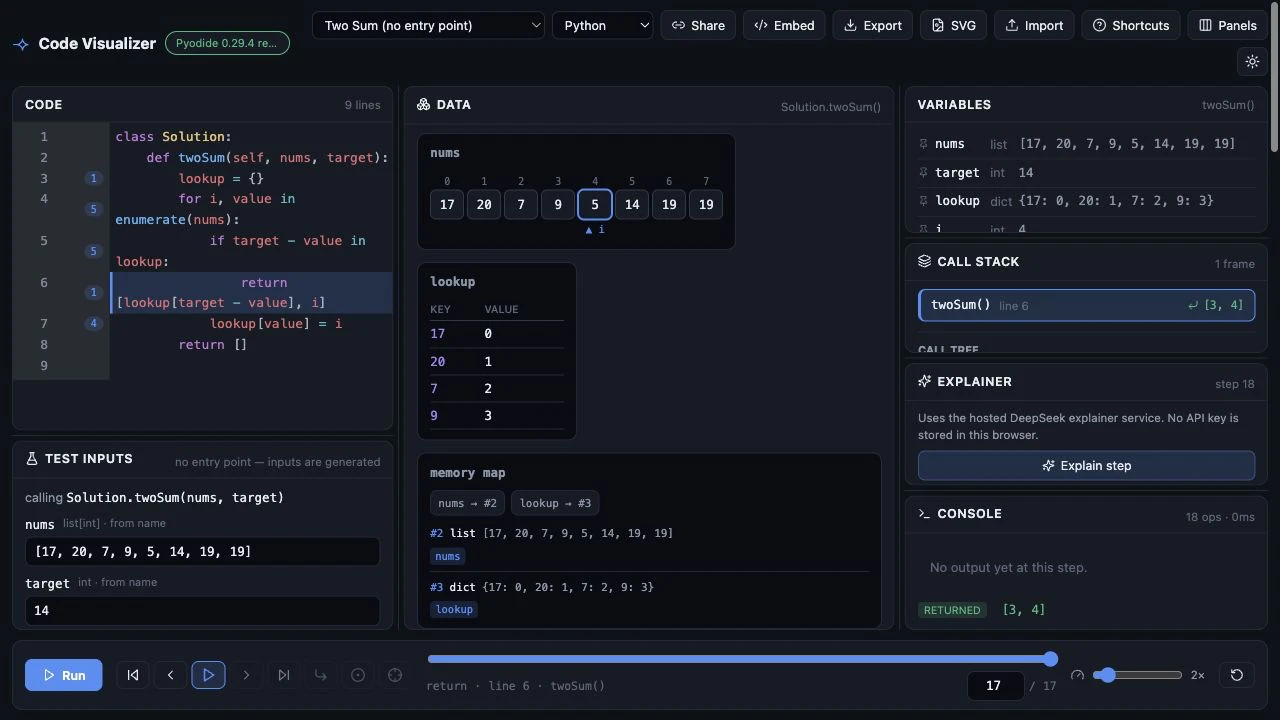
A browser-based Python runtime map that lets learners see what each line changes in scopes, variables, object references, and output.
The problem
Reading code is not the same as seeing it run.
Execution state is usually hidden behind a console or debugger. Learners can see the source line, but not how a loop, function call, alias, or in-place mutation changes the program's objects.
My contribution
I built the tracing engine and interface independently.
The app runs Python with Pyodide in a Web Worker, captures execution events with sys.settrace, and combines them with static AST analysis. The UI presents normalized frames as a timeline with line jumping, variable and object inspection, scope boxes, reference arrows, stdout, and errors.
- Kept execution in the browser so trying an example does not require an account or server-side code runner.
- Preserved object identity across snapshots to show aliasing and in-place mutations accurately.
- Added shareable examples and trace export so a specific execution can be revisited.
Design decision & result
Make the trace inspectable, not just animated.
Snapshot-first tracing lets a user pause, scrub backward, and inspect why state changed at a particular line. The result is a working interactive app—not merely a recorded demonstration—that visitors can try with their own Python code.